Hey folks,
Quick tip for anyone exposing services in containerized environments. If you’ve worked with Kubernetes, you know a lot of its networking relies on iptables and NAT behind the scenes.
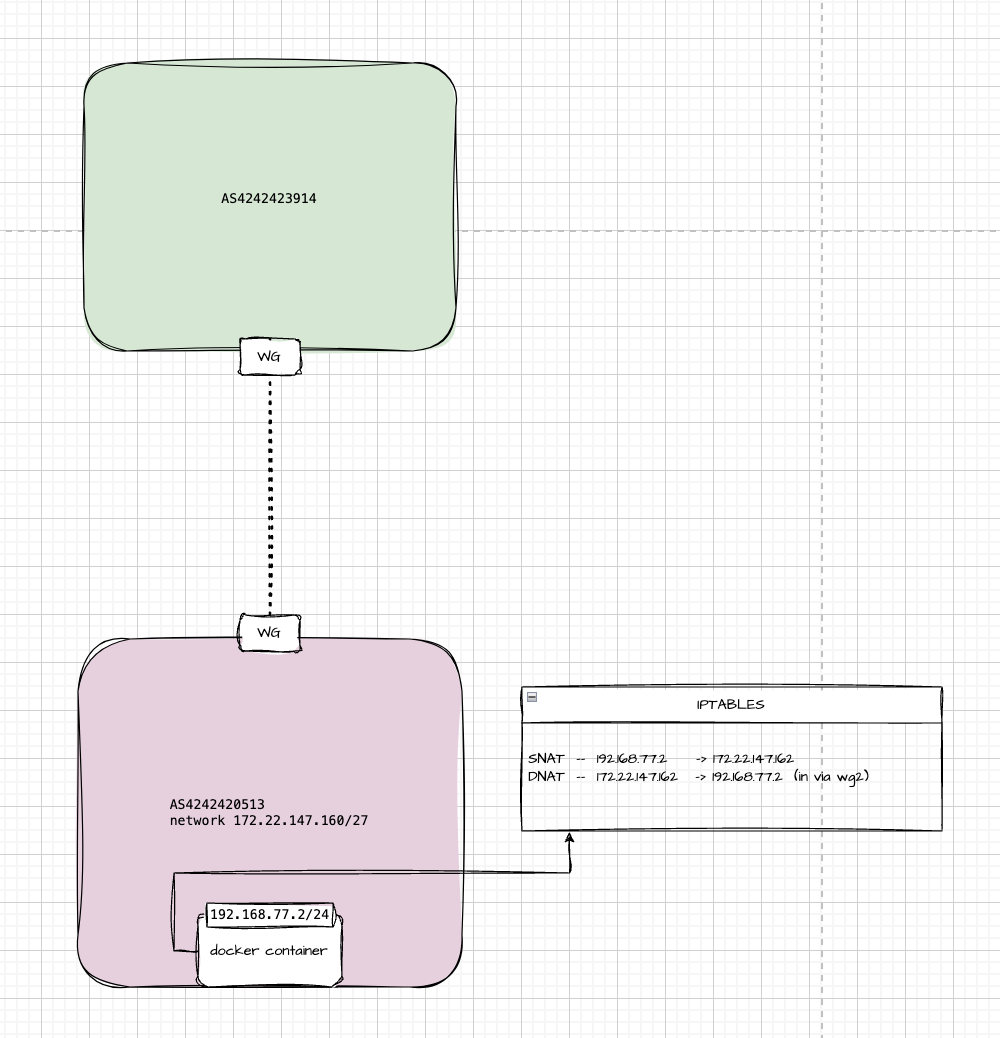
In my lab, I’m running plain Docker — no Kubernetes — with a container that has a private IP of 192.168.77.2. To make it reachable from a remote peer over WireGuard, I’m using two NAT rules: one for SNAT and one for DNAT.
Why? Because in my overlay mesh network, only IPs in the 172.20.0.0/14 range are routable. My little slice is 172.22.147.160/27. What’s interesting is that none of those IPs are actually assigned to physical interfaces — the whole setup is virtual, Layer 3 only, and runs entirely over WireGuard tunnels. Route distribution is handled via BGP.
Simply put, I just rewrite the packet’s source and destination IPs, and the remote side sees traffic coming from a valid IP in the routable mesh.
Here’s what the iptables rules look like:
# SNAT: outgoing packets from the container
iptables -t nat -A POSTROUTING -s 192.168.77.2 -j SNAT --to-source 172.22.147.162

# DNAT: incoming packets to the routable IP get forwarded to the container
iptables -t nat -A PREROUTING -i wg2 -d 172.22.147.162 -j DNAT --to-destination 192.168.77.2
This allows the container to both send and receive traffic as if it lived on the overlay network.